

Mobile POS app in Kenya: run your shop from your phone
BizPlus POS is a mobile point of sale app built for Kenyan businesses. Install it on the Android phone or tablet you already own, add your products and start selling in minutes: take M-Pesa and cash, give receipts, and watch your stock and sales update as you trade.

Rated 4.8 out of 5 from 84 ratings on Google Play (November 2026).
What you can do from your phone
The app is the same POS software that runs on our desktop and web versions, laid out for a small screen and a busy counter.
Sell and check out fast
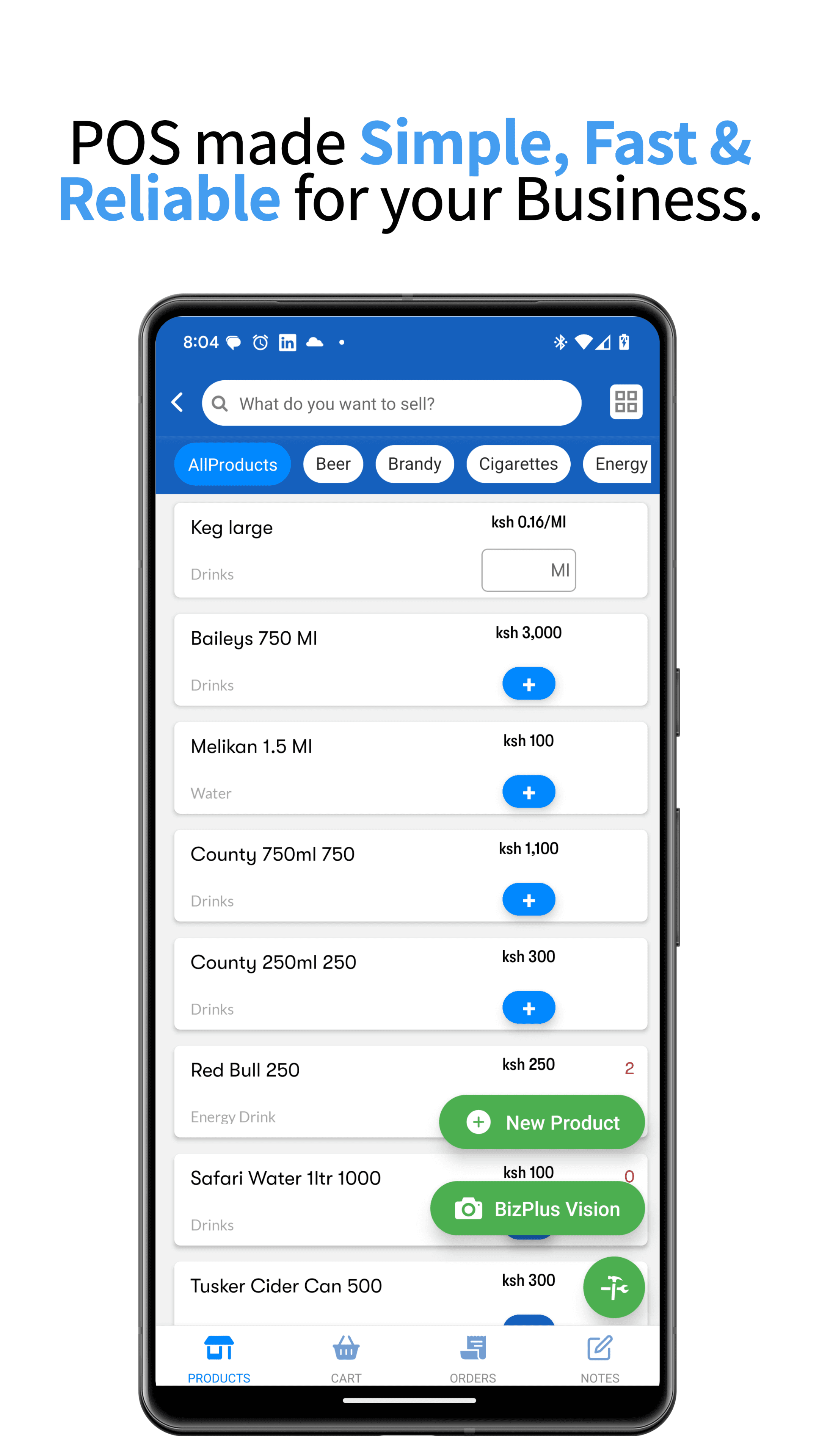
Search for an item or scan its barcode, add it to the cart and take payment. Save open orders for customers who settle later, refund a receipt in a couple of taps, and sell by item or by measure such as kilos, litres or metres.
Accept M-Pesa and cash
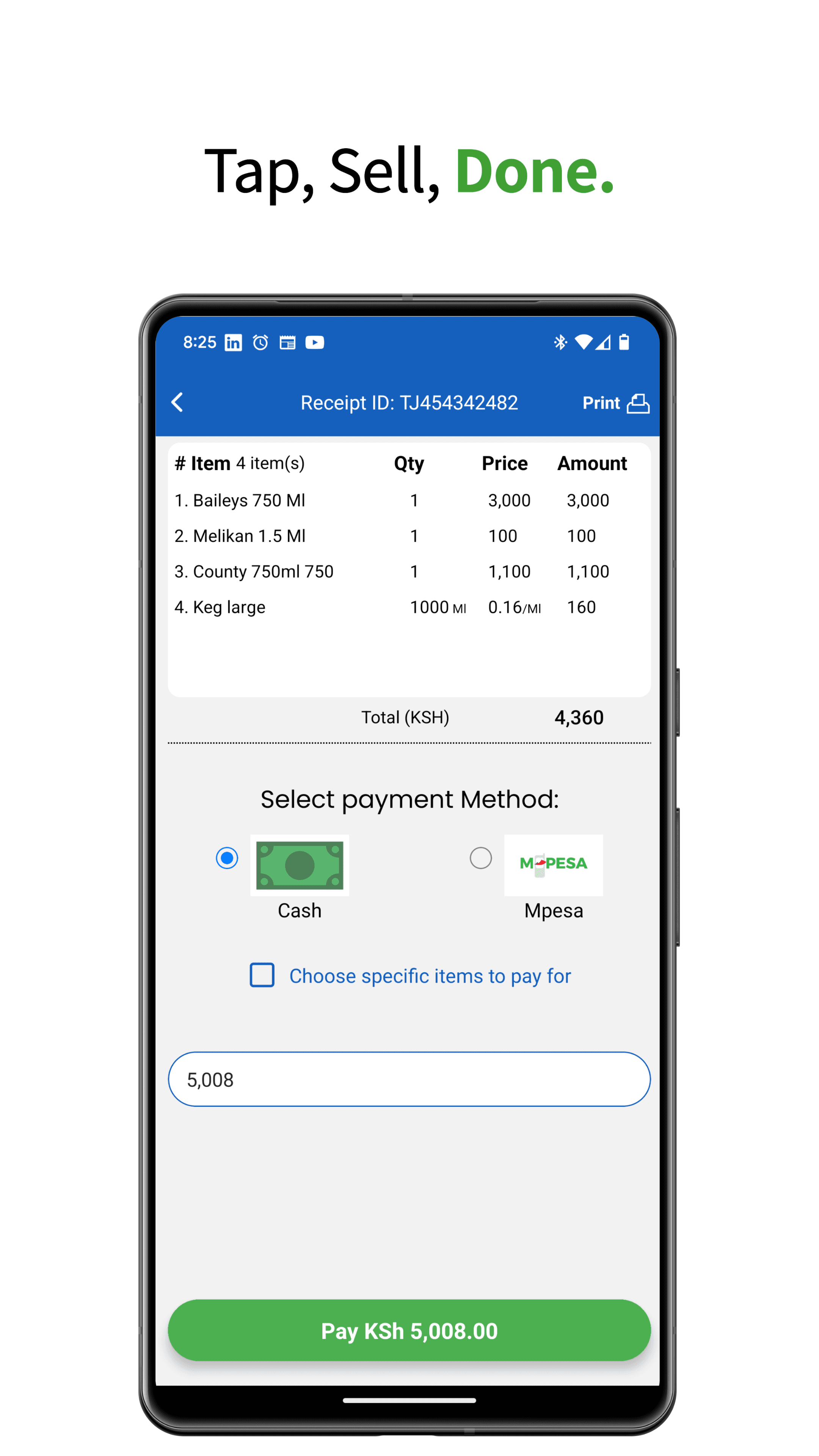
Choose M-Pesa or cash at checkout and the payment is recorded against its receipt, so the end-of-day totals on your phone match the money you collected. Customers who pay later are tracked by name, with what they still owe.
Know your stock
Stock levels drop with every sale. Get low-stock alerts, record deliveries and damages, raise purchase orders and move stock between branches. Import thousands of items from a CSV spreadsheet instead of typing them in one by one.
Receipts customers can keep
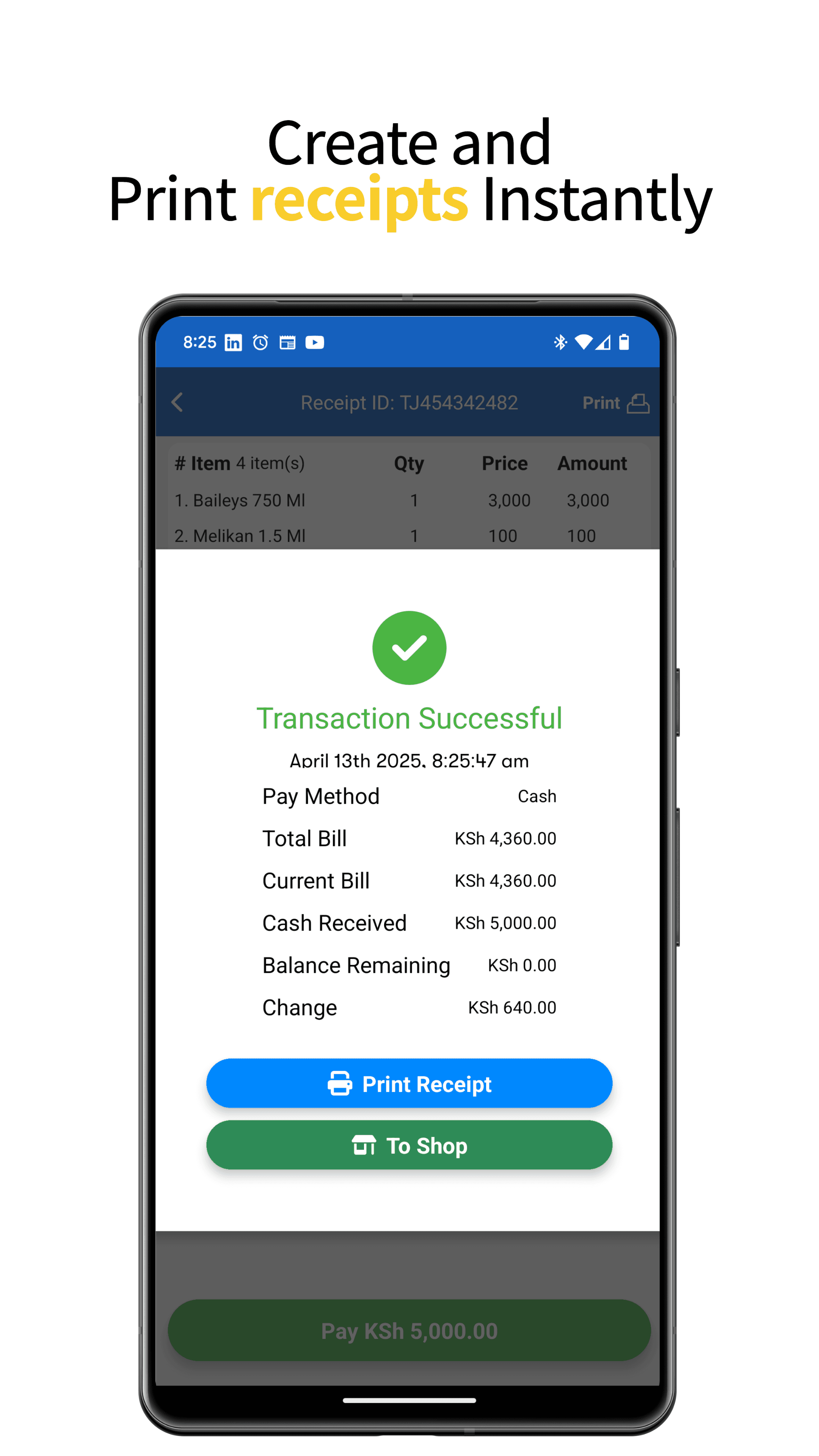
Print receipts with your logo on a Bluetooth receipt printer, or send them by SMS or email when the customer does not need paper.
Reports in your pocket
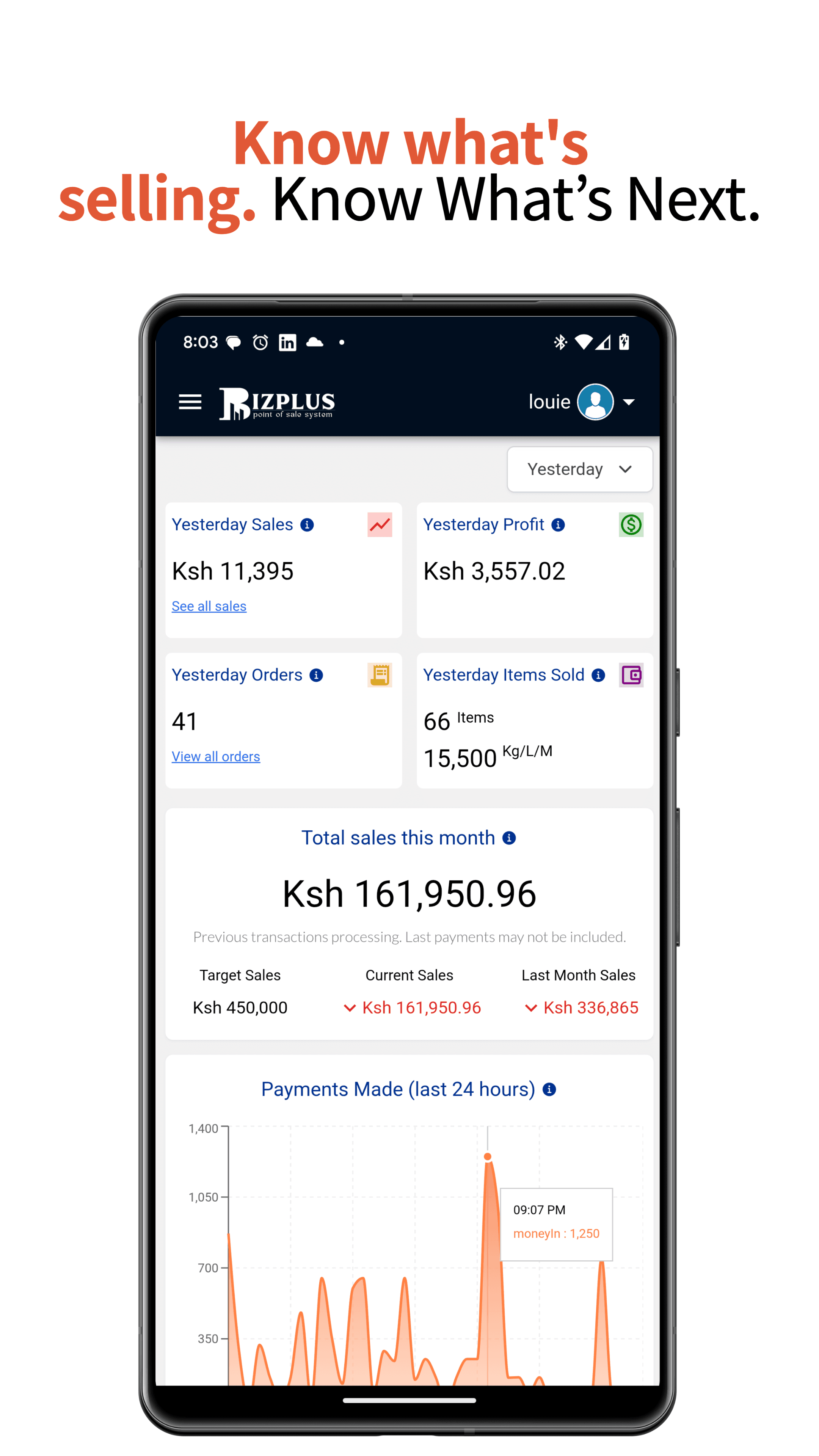
See today's sales, profit, orders and best-selling items from wherever you are. Compare this period with the last one, check sales by employee and export reports to a spreadsheet for your accountant.
Staff and branches
Give each cashier or manager their own login and decide what they can see. Run one shop or several from the same account: every phone, tablet and computer stays in sync through the cloud.
See the app at work
How to start selling from your phone
- 01
Install the app
Download BizPlus POS from Google Play on your Android phone or tablet.
- 02
Create your account
Register your business and enter your shop details. It is free to start.
- 03
Add your products
Type items in, scan their barcodes or import your whole price list from a spreadsheet.
- 04
Start selling
Ring up the first sale, take M-Pesa or cash and hand over a receipt.
All you need is an Android smartphone or tablet and an internet connection. There is no till, server or special terminal to buy; a Bluetooth receipt printer is optional. Our how it works page walks through setup, and the video tutorials show each screen.
Built for small businesses and retailers across Kenya
One sales app, set up differently for each kind of counter.
Retail shops, minimarts and dukas
Quick checkout at a busy counter, with low-stock alerts before a shelf runs empty.
Wines and spirits shops and bars
Keep open orders running until the customer settles, sell kegs by the millilitre and see sales per attendant.
Restaurants and cafés
Send orders to a kitchen printer or kitchen display and let guests pay when they are ready.
Pharmacies and agrovets
Track every product line, get a daily low-stock list and raise purchase orders to suppliers.
Hardware and electronics shops
Sell by the metre, kilo or piece and keep a record of customers buying on credit.
Boutiques and bookshops
Use variants for sizes and colours instead of duplicate products, and import a long catalogue from a spreadsheet.
Butcheries and groceries
Price by weight and let the app work out the amount for each sale.
Phone, tablet or computer
Your account works on the Android app, on the Windows and Mac desktop apps and in a web browser. Many owners sell on a phone at the counter and open a laptop for the back office: stock, reports and staff. On an iPhone or iPad, use BizPlus POS in the browser for now; the iOS app is coming soon.
What it costs
The app is free to install and every premium feature is free until 1 January 2027. After that, the Basic plan is Ksh 999 a month or Ksh 10,000 a year, and the Premium plan is Ksh 1,799 a month or Ksh 18,000 a year. Prices are in Kenyan shillings.
Mobile POS questions from Kenyan business owners
Can I run my shop from just a phone?
Yes. The Android app is a full point of sale system: you can add products, sell, take payment, issue receipts and read your reports on the same phone. A tablet or computer is optional, and many owners add one later for back-office work.
Which phones does the BizPlus POS app work on?
It runs on Android smartphones and tablets and is installed from Google Play. An iPhone and iPad app is coming soon; until then you can use the web POS in your browser.
Does it work with M-Pesa?
Yes. M-Pesa and cash are both payment options at checkout, and each payment is saved with its receipt. Our guide explains how M-Pesa integration works in BizPlus POS.
Do I need internet to use it?
BizPlus POS is cloud-based, so you need an internet connection to set up your account and to keep sales and stock in sync across your devices; mobile data is enough. The paid plans list an offline mode with conditions, so ask our team how it behaves on your device before you depend on it.
How much does the mobile POS app cost in Kenya?
The app is free to download, and all premium features are free until 1 January 2027. After that, the Basic plan is Ksh 999 a month or Ksh 10,000 a year, and the Premium plan is Ksh 1,799 a month or Ksh 18,000 a year. The pricing page shows what each plan includes.
Do I need to buy special POS hardware?
No. The software runs on the phone or tablet you already have, so there is no till or server to buy. If you want printed receipts, add a Bluetooth receipt printer; the app works with the common mobile Bluetooth printers.
Does BizPlus POS support KRA eTIMS?
KRA integration is included in the Premium plan. Talk to us about your eTIMS setup before you rely on it, so we can confirm it covers the way your business invoices.
Can I use it in more than one shop?
Yes. Paid plans support several locations under one account, and you see sales and stock for each branch separately or together. An extra location costs Ksh 500 a month on the Basic plan.
How do I move my existing products into the app?
Import them from a CSV spreadsheet in one go, or add them one at a time on the phone. You can keep selling while you finish the list.
Can I get help setting it up?
Yes. Call or WhatsApp us on +254 759 266 327, watch the video tutorials, or request a free demo with the form below.
Not Sure Where to Start?
Get FREE consultation with our experts!- Find the perfect setup for your business
- Get answers to all your questions
- Receive a personalized demo
We'll contact you within 2 business hours. No spam, guaranteed 🔒